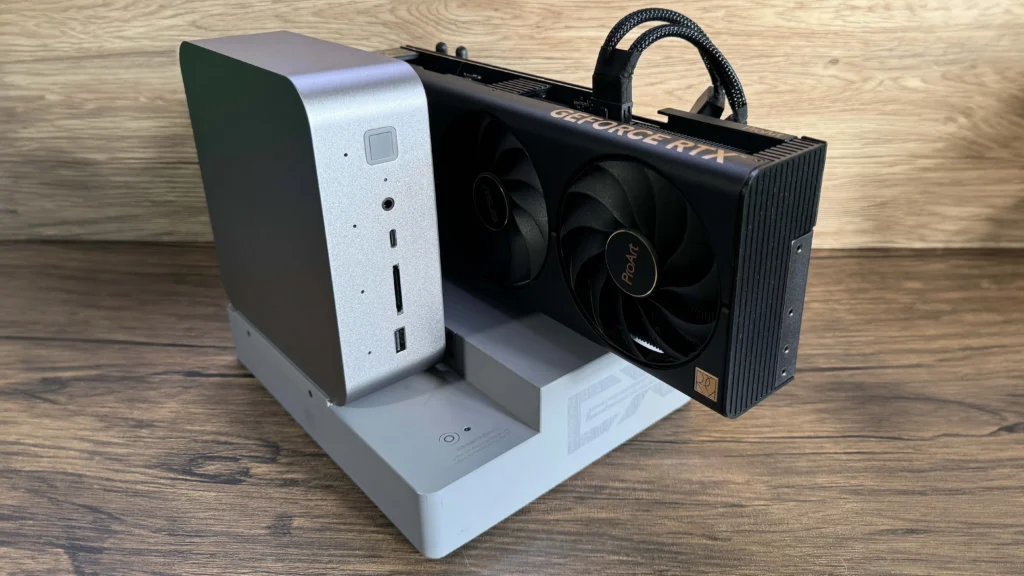
An external GPU (eGPU) setup is a handy way to test a used graphics card before committing to a full build.
As of 2026, the “best deal” used GPU is the one you can verify and still return if it’s junk. Europe and the US feel similar (same cards, same scams), but the safest buying routes differ because marketplace protections, shipping norms, and payment habits aren’t identical. This guide is decision-first: where to buy, what to avoid, and how to test a GPU fast without needing a full PC lab.
Verdict Box
Buy if:
- You can use on-platform buyer protection (eBay MBG / Kleinanzeigen “Sicher bezahlen” / etc.).
- Seller provides clear photos + serial/label + proof it runs under load.
- You can do a 5–10 minute check (temps + artifacts + stability) before money changes hands
Skip if:
- Seller pushes off-platform payment/shipping (“I’ll send a courier, pay by transfer/crypto”).
- Listing is too cheap + urgent + profile looks new/blank.
- They refuse any test / any video / any buyer-protected checkout.
Best alternative: Buy a lower-tier card from a retailer with returns, then upgrade later.
Fair used price in Europe (2026)
Europe-wide used GPU pricing is Not confirmed here because it swings hard by model, country, and whether the listing includes VAT invoice/return rights. What is consistent: your safest EU deals usually come from marketplaces with integrated checkout/payment protection rather than “DM and bank transfer.” Examples to prioritize: eBay (Money Back Guarantee) and Kleinanzeigen “Sicher bezahlen” where available.
Country snapshots (Not confirmed): Germany often has deep local inventory via Kleinanzeigen, while France commonly routes safer shipping through Leboncoin’s paiement sécurisé when used properly. (Source: Leboncoin ) Also watch cross-border listings: buyer protection can depend on where checkout happens on the platform.
What affects used pricing
Used GPU pricing isn’t just “FPS per euro.” It’s also risk pricing: the more uncertainty (no returns, sketchy payment, unknown history), the cheaper it gets sometimes for a reason. Platforms with dispute paths tend to price higher but reduce the chance you eat the loss. In the EU, shipping + protection tools like Leboncoin/Subito/Kleinanzeigen can narrow the gap versus random Telegram deals.
AI Tax (16–24GB cards): high-VRAM GPUs can stay expensive because local AI/creator workflows are VRAM-bottlenecked, so demand isn’t purely gaming-driven. Mixed-precision/optimizer states also drive memory needs in training contexts, which keeps “more VRAM” desirable.
That’s why a 16GB+ card can cost disproportionately more than its gaming FPS uplift suggests especially in the used market.
- Condition (clean PCB, no corrosion, no bent fins)
- Brand/cooler (bigger heatsinks = quieter, often longer-lasting)
- Warranty/receipt (proof of purchase can matter for support)
- VRAM tier (16–24GB often carries the AI Tax)
- Marketplace risk (protected checkout vs off-platform payment)
Is it worth it in 2026?
Buying used is still worth it in 2026 if you treat it like a verification problem, not a treasure hunt. Your edge is simple: most sellers can’t (or won’t) prove stability. If you can test quickly, you filter out lemons and ex-mining survivors with degraded cooling. A protected checkout + a short stress test beats “trust me bro” every time. Tools like 3DMark and OCCT are widely used for repeatable stability checks.
Who this is for / not for
- For: budget builders, tinkerers, people comfortable checking temps/sensors.
- Not for: anyone who can’t test in-person and can’t use buyer protection.
- For: creators/AI hobbyists who specifically need more VRAM (watch the AI Tax). (Source: HF perf guide
- Not for: “I need it tomorrow, zero risk” buyers go retail.
Quick decision: If you can’t get protection + a 10-minute test window, skip the listing.
Best alternatives
If “used GPU safety” feels messy, your best alternative is changing where you buy, not which GPU you buy. In Europe, prioritize protected-checkout marketplaces (eBay, Kleinanzeigen secure pay, Leboncoin secure pay, Subito protection) over random DMs.
In the US, if you must do local pickup, copy the “meetup spot” playbook: public, well-lit, ideally a designated exchange zone. OfferUp explicitly recommends public meetups and avoiding home meetups.
| GPU | Typical used price (EU) | VRAM | Best for | Trade-offs |
|---|---|---|---|---|
| Any 8–12GB card | Not confirmed | 8–12GB | mainstream gaming | fewer “AI Tax” buyers, but less headroom |
| Any 16GB card | Not confirmed | 16GB | creators + lighter local AI | AI Tax can inflate price |
| Any 24GB card | Not confirmed | 24GB | heavier local AI/creator loads | expensive used; check thermals carefully |
People also read
Deal Score (0–10)
Your Deal Score is a reality check, not a vibe. Start at 10, then subtract for risk. Protected checkout and dispute paths add real value: eBay’s Money Back Guarantee and PayPal Purchase Protection exist specifically for “not received / not as described” outcomes.
If the seller can’t demonstrate stable load (video + sensors) your score should crash fast you can check our Safe-buy checklist.
Can warranty help on a used GPU?
Sometimes but warranty rules vary by brand and proof-of-purchase matters.
What’s the #1 scam signal?
Pressure to leave the platform (“pay by transfer, I’ll ship tomorrow”) + too-good-to-be-true pricing.
“What’s next?”
Safe used GPU buying in 2026 is mostly about process: stay on-platform, demand proof, and run a quick standardized test before you pay. EU buyers should lean harder on integrated payment protections; US buyers should lean harder on safe meetup discipline. If a seller won’t cooperate, you’re not missing a deal you’re dodging a problem. What’s next? Pick your marketplace, copy the checklist, and score every listing before you message.